This interactive 50.8-square-foot studio needs JavaScript and WebGL 2. Enable JavaScript to explore the room. No account or API key is required.
The planner needs WebGL 2. Try a current browser with hardware acceleration enabled, or use another device. Your saved layouts have not been deleted.
The About and Controls buttons remain available.
The room today, and the steps to make it a working studio.
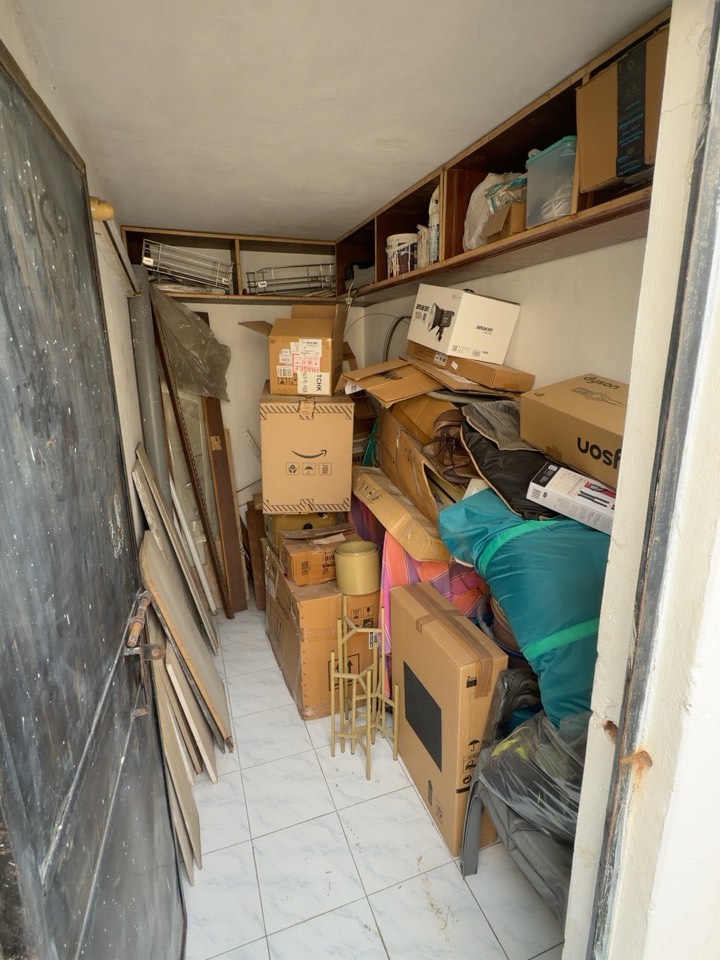
A storage room, with the overhead shelves and tiled floor staying in place.
The 3D stage view is unavailable. The stage descriptions and current room photographs are still available.
Drag to look around · Scroll or pinch to zoom
Areas and walking clearances are approximate on a 5 cm sampling grid. Bench surface area uses exact dimensions. Storage is 75% of gross cabinet volume, an estimate before dividers / roll packing. Accessible socket counts are geometric estimates, assuming clear under-table access. Green means the selected planning allowances fit, not that a physical installation has been verified.
A real 50.8-square-foot room, planned with Codex before the fit-out.
Move the equipment, compare layouts, and work out what fits.
Your changes stay in this browser.
A narrow, 50.8-square-foot room is being converted into a single-person leatherworking studio. The challenge is to fit an industrial sewing machine, a workbench, leather storage, and usable access into the actual space.
Room photos and tape-measure dimensions became the starting point for a Three.js model. Codex helped implement editable equipment, layout comparisons, clearance checks, electrical markers, lighting previews, local saves, and the public-demo interface.
Compare four arrangements; move and resize furniture; inspect measurements; place proposed sockets; and preview task lighting. Layout D intentionally shows conflicts instead of pretending everything fits.
The room dimensions are measured. Equipment models, cabinet details, lighting, operating allowances, and storage capacity are planning estimates. This is not factory CAD, a photometric calculation, or an electrical installation design.
Saved layouts stay in your browser. Export a copy to keep it or open it on another device.
Garvit Kharbanda ↗